Gantt chart editor for dated tasks and dependencies
Turn dated tasks and dependencies into a maintainable project schedule without dragging bars across a canvas.
A Gantt chart earns its place once tasks have dates and depend on each other. For a roadmap without exact dates a timeline is lighter, and for branching decisions a flowchart is the right shape.
How to make a Gantt chart online
- Declare
dateFormatonce and keep every task date in that format; a mismatch is the most common reason a Gantt chart refuses to render. - Group tasks into sections that match the phases you actually report on, such as design, build, and release.
- Give each task either a start date and a duration, or an
afterdependency on an earlier task identifier. - Mark milestones and completed work, then export PNG for a status update or PDF for a printed plan.
Gantt chart syntax cheat sheet
| What it does | Syntax | Notes |
|---|---|---|
| Start | gantt | Selects the Gantt diagram type. |
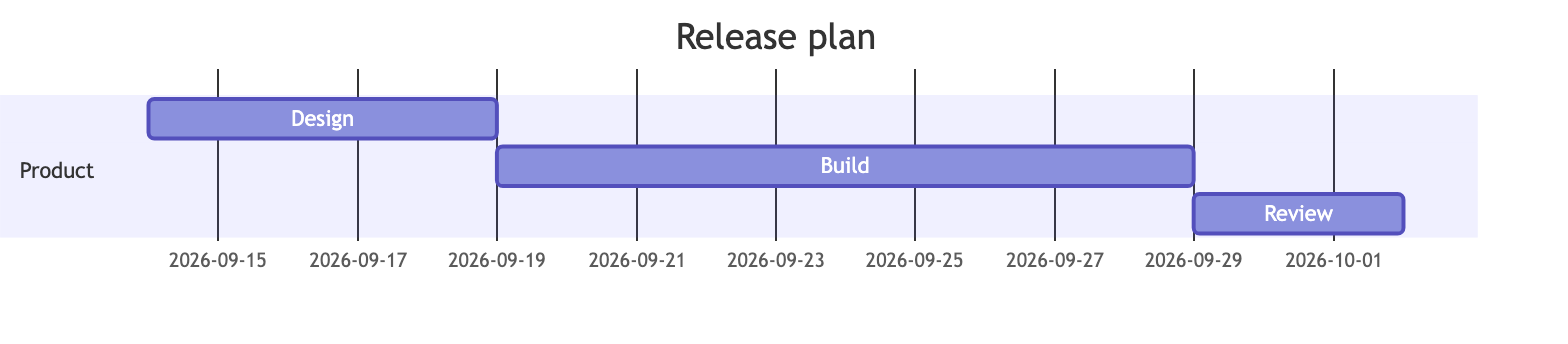
| Title | title Release plan | Adds a visible chart title. |
| Date format | dateFormat YYYY-MM-DD | Defines how task dates are parsed. |
| Section | section Product | Groups related tasks under a heading. |
| Duration | Build :build, 2026-09-14, 10d | Sets an identifier, a start date, and a length. |
| Dependency | Review :after build, 3d | Starts a task when an earlier task finishes. |
Editable Gantt chart examples
- Release plan — Edit this dependent release schedule in Mermaid, inspect the rendered result, and adapt the working source for your own documentation.
All Gantt chart examples · the whole example library
Frequently asked questions
Which date format should a Mermaid Gantt chart use?
Declare dateFormat explicitly and keep every task date consistent with it. Mixing formats inside one chart is what usually produces a parse error.
Can Mermaid Gantt tasks depend on each other?
Yes. Write after followed by the identifier of the earlier task, which is why every task that others depend on needs an identifier.
Can I print a Gantt chart?
Yes. Export PDF and choose paper size and orientation; landscape usually suits a schedule that runs across several months.
Keep reading
Export formats · Fix diagram errors · all guides
mermaid.tools is an independent editor not affiliated with the Mermaid.js project or Mermaid Chart / mermaid.ai. Diagrams render in your browser with Mermaid 11.17.2.