State diagram editor for lifecycles and transitions
Model the states work can be in and the events that move it between them, from background jobs to order lifecycles.
A flowchart answers “what happens next”; a state diagram answers “what is allowed now”. Choose it when the same object behaves differently depending on where it sits in its lifecycle.
How to make a state diagram online
- Begin with the initial marker and connect it to the first state the work enters.
- Add one transition per event, labelling it with the thing that causes the change rather than the state it leads to.
- Send every terminal state to the end marker so a reader can see where the lifecycle stops.
- Nest related states inside a composite state once a single level starts to sprawl, then export the result.
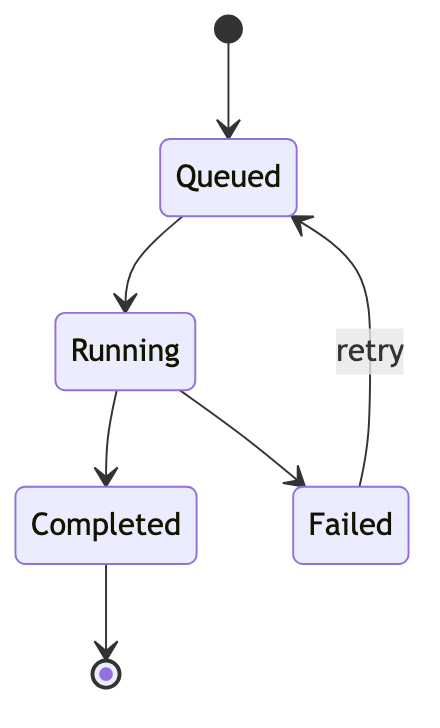
State diagram syntax cheat sheet
| What it does | Syntax | Notes |
|---|---|---|
| Start | stateDiagram-v2 | Selects the current state diagram syntax. |
| Initial state | [*] --> Queued | Connects the initial marker to the first state. |
| Transition | Queued --> Running | Describes one allowed state change. |
| Event label | Failed --> Queued : retry | Names the event after a colon. |
| Final state | Completed --> [*] | Connects a terminal state to the end marker. |
| Composite state | state Active { ... } | Nests a smaller state machine inside a state. |
Editable state diagram examples
- Background job states — Edit this background job state machine in Mermaid, inspect the rendered result, and adapt the working source for your own documentation.
- Order lifecycle — Edit this commerce order lifecycle in Mermaid, inspect the rendered result, and adapt the working source for your own documentation.
All state diagram examples · the whole example library
Frequently asked questions
How do I mark start and end states?
Use the [*] marker as the source of the first transition and as the target of every final transition.
Can transitions have labels?
Yes. Add a colon and the event or condition after the arrow, which keeps the state names short and the causes explicit.
Can a state contain other states?
Yes. A composite state holds its own smaller state machine, which is the usual way to keep a long lifecycle readable.
Keep reading
Fix diagram errors · Export formats · all guides
mermaid.tools is an independent editor not affiliated with the Mermaid.js project or Mermaid Chart / mermaid.ai. Diagrams render in your browser with Mermaid 11.17.2.